

Demo
Trial / demo
€0
✓
1 WBSO project
✓
3 users
✓
25 hour entries
✓
25 evidence items
✓
WBSO auditpack export
We use essential cookies for sign-in and security. With your consent, we also use analytics cookies to understand product usage. You can accept or decline non-essential cookies. Privacy Policy
WBSO administration for software teams
R&Dossier helps software teams keep WBSO projects, hours, and technical evidence organized in one review-ready workflow — integrating with the systems your team already uses, with nothing to change. You choose what happens on its own, and what still waits for a person.
Built for Dutch software teams applying for WBSO — and the advisors and consultants who support them.
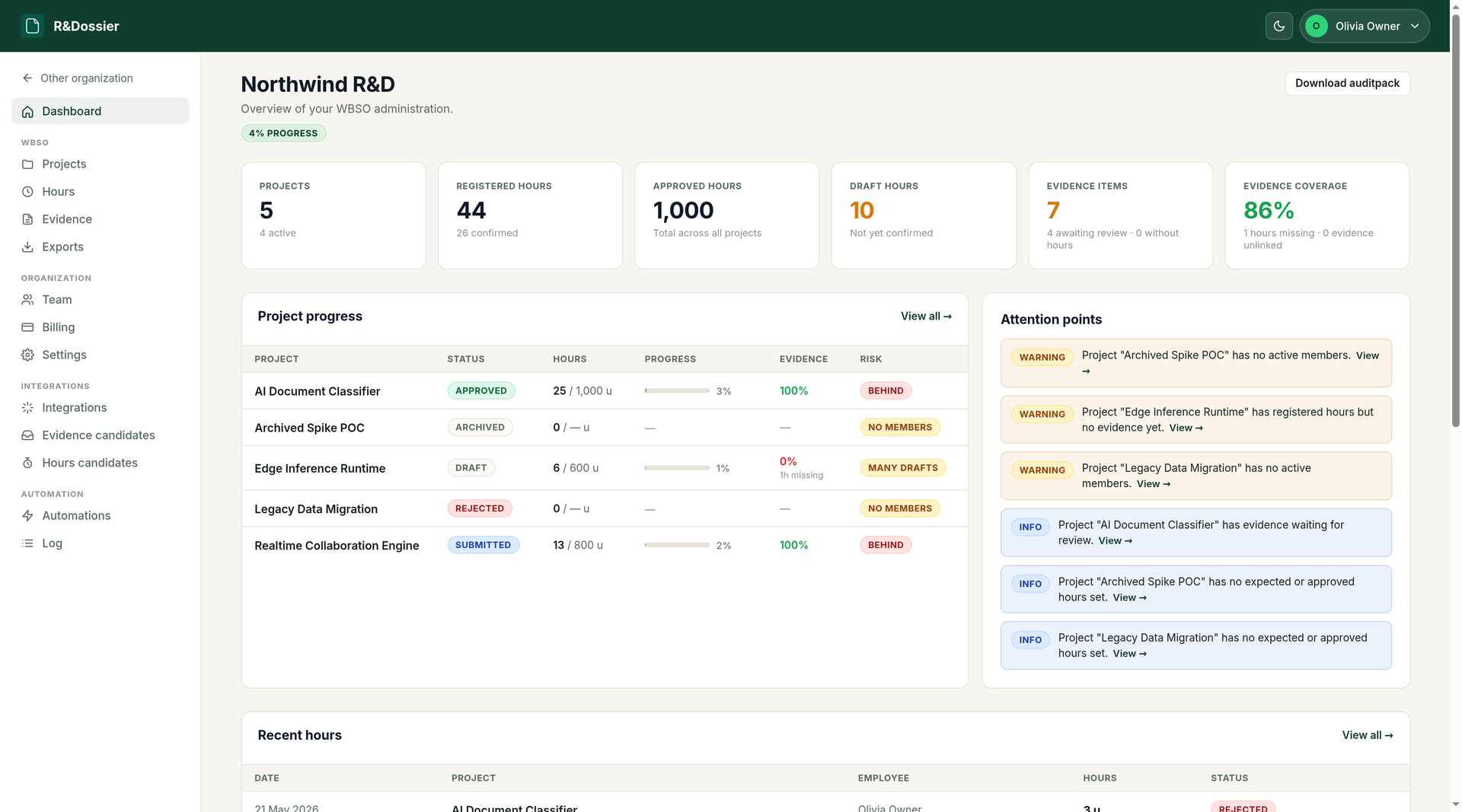
Projects, hours and evidence coverage in one live overview.
The hidden problem
The technical work happens across the tools your team already uses — code, issues, docs, meetings, and code reviews. The administration often has to be reconstructed later.
Turning point
Create WBSO projects, assign members, register hours, automatically sync technical work from the systems your team already uses, link evidence to hours, and export a structured auditpack when you need it.
Not another spreadsheet. A workflow for keeping your WBSO dossier alive during the year.
How it works
Create the project, connect your tools, review what syncs in, turn it into hours and evidence, link them, and export — each step a point on the same structured dossier.
Define the technical description, approved hours, and development period for each R&D track.
$ project: adaptive-retrieval · 1,600h approved · Jan–Jun 2026Map your development tools and time tracker to your WBSO projects so the relevant work syncs in automatically — no change to how your team works.
Optional — you can also work entirely by hand.
$ mapped: org/retrieval-api → adaptive-retrieval · synced: 14 itemsSynced work lands as candidates first — evidence candidates from your dev tools, hours candidates from your time tracker. Your team decides what belongs in the dossier.
Switch on auto-import and this review step happens on its own.
$ scanned: 14 candidates · 9 evidence · 5 hours · awaiting reviewApproved candidates become evidence and draft hours against the project, ready to review and confirm.
Or add evidence and log hours by hand — no integration required.
$ imported: 6 evidence · 12h draft · +2 manual notesConnect each piece of evidence to the hours it supports, so work, people, and technical progress explain each other.
Auto-link can make the confident matches for you.
$ linked: PR #1421 → 3 hour entriesGenerate a structured WBSO auditpack with projects, hours, evidence, evidence-hour links, and attention points.
$ export: wbso-auditpack-2026.xlsx · projects · hours · evidence · linksIntegrations
Your team keeps working in the tools they already use — nothing changes in their workflow. R&Dossier connects to those systems and syncs the relevant work automatically: development tools become review-ready WBSO evidence, and your time tracker becomes registered hours.
Missing an integration? We co-invest in new connectors →
Automation
You have just seen the whole walk. Most of it can run without you — but only the parts where a machine cannot get it wrong in a way an auditor would notice. R&Dossier automates collection, not judgement.
Every automation is off until you switch it on, runs on the schedule you set, and can be undone — and each action it takes is written to an automation log you can audit, so the parts that run on their own are never a black box.
A living WBSO dossier.
Built during the year — not reconstructed at the deadline.
Pricing
Start free with Demo and scale as your WBSO dossier grows.
Founding customer pricing. Lock in your plan while we are onboarding the first WBSO teams.
Trial / demo
1 WBSO project
3 users
25 hour entries
25 evidence items
WBSO auditpack export
Small teams
3 WBSO projects
15 users
1,000 hour entries
500 evidence items
Integrations & auto-sync
Automation: auto-scan, auto-import, auto-link
WBSO auditpack export
For teams running WBSO structurally
10 WBSO projects
50 users
10,000 hour entries
5,000 evidence items
Integrations & auto-sync
Automation: auto-scan, auto-import, auto-link
WBSO auditpack export
Larger teams and advisors
Custom limits
Sales-led onboarding
Priority support
Custom work
FAQ
R&Dossier is a WBSO administration workspace for software teams. It helps you manage WBSO projects, members, hours, evidence, integrations, dashboard checks, and exports.
No. R&Dossier helps you prepare and maintain a structured WBSO administration. The export can support internal review, advisor handover, and control preparation, but it does not replace the official RVO realization process.
Yes. R&Dossier integrates with the systems your team already works in and maps them to your WBSO projects. Development tools (GitHub, Linear, Azure DevOps) sync technical work into candidates you can import as evidence, and a time tracker (TimeChimp) syncs registered time into hours — without changing how your team works.
Yes. Connect a supported time tracker (TimeChimp today) and registered time syncs in as draft hours for review — one row per person per day, mapped to your WBSO projects. Time only imports for people you link to a member, and confirming those hours always stays a decision a person makes.
Only if you ask it to. By default synced work lands in a candidate queue and your team decides what becomes official evidence. An organisation can switch on auto-import, and then new candidates become evidence on their own — still marked unreviewed, still removable.
You choose. Scanning your connected tools for new activity is the automatic part, and it only fills a review queue. Turning candidates into evidence, turning synced time into draft hours, and linking evidence to hours are opt-in switches with their own schedule. Confirming hours, submitting or approving projects, and judging uncertain matches are never automatic. Every automated action is written to an automation log you can audit.
Yes. Evidence and hours are linked many-to-many. One synced item can support multiple hours entries, and one hours entry can have multiple evidence items.
No. R&Dossier helps your team keep better administration and evidence. Advisors can still review the dossier and use the export to work faster.
R&Dossier is built for Dutch SaaS, AI, cybersecurity, and software companies using WBSO — and for the WBSO advisors and consultants who support them. Teams keep the dossier alive during the year; advisors can be invited in to maintain client administration and review it faster.
Yes. You can create projects, register hours, and add manual evidence first. Your tools can be connected later.